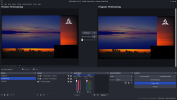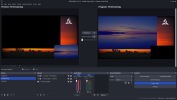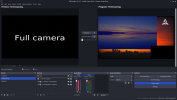

Hello. I'd like to report a problem I've had with OBS. I'll add example images. I created a scene, and within it I have grouped sources (background image, camera, presentation, and logo). I created two groups; the only difference is the size of the camera and the presentation. In one group, the presentation is large and the camera is small; in the other, the presentation is small and the camera is large. There's a slight overlap at the base of the larger source by the smaller source. If I only worked with these two source groups, everything would be fine. But since I also have to use the camera in full-screen mode, a problem occurs after that: in the group where the camera is large and the presentation is small, the camera overlaps the small presentation. Even with the sources locked, this change occurs.
I would appreciate your help in resolving this overlap. I've already tried resolving this by recreating the group, creating it on another computer, but it's the same. The "Edit Transform" menu option didn't help either; in fact, it didn't change anything.
The images are in sequence.
The black rectangle is the camera.
I would appreciate your help in resolving this overlap. I've already tried resolving this by recreating the group, creating it on another computer, but it's the same. The "Edit Transform" menu option didn't help either; in fact, it didn't change anything.
The images are in sequence.
The black rectangle is the camera.